INITWIN · Editorial
Software & digital strategy
How to write a good software requirements document — template included
A practical guide for clients who want to come prepared to a meeting with a software company
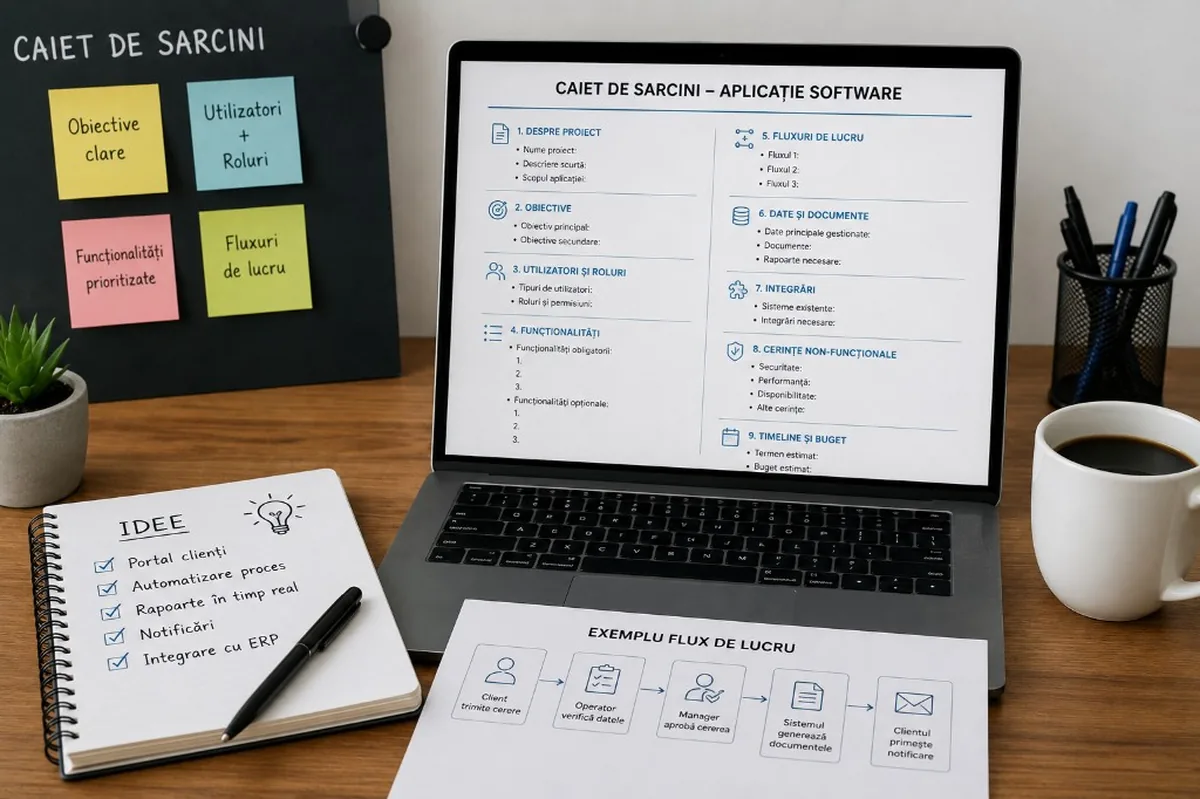
A practical guide for clients who want to come prepared to a meeting with a software company — what a good requirements document includes and how to structure it step by step.
A good software project does not start with coding. It starts with clarity.
Before a development team writes the first line of code, they need to understand what problem must be solved, who will use the application, what processes exist in the company, which features matter and what business outcome is being pursued. This is where the requirements document comes in.
For many clients, the phrase “requirements document” (or “specification”) sounds technical, rigid or suited only for tenders and large projects. In reality, it can be a simple, clear and practical document that helps enormously in the discussion with a software company.
It does not have to be perfect. It does not have to be written like a legal document. It does not need to contain technical architecture or programming details. Its role is to create a shared basis for discussion between the client and the team that will build the application.
A good requirements document shortens the analysis stage, reduces misunderstandings, helps estimate costs correctly and increases the chances that the final application will solve the company’s real problem.
What is a requirements document for a software application?
A requirements document describes what a software application must do, who it is built for, what problems it solves, what features it must include and what conditions must be met.
For a web application, client portal, custom CRM, marketplace or internal platform, the requirements document may include:
- business context;
- the current problem;
- project objectives;
- user types;
- roles and permissions;
- desired features;
- workflows;
- data and documents managed;
- required reports;
- integrations with other systems;
- security requirements;
- estimated budget;
- desired launch deadline;
- support needed after implementation.
The clearer this information is, the more efficient the discussion with the software company becomes.
Why is a requirements document important?
Without one, many projects start from general statements: “We want an application for clients.” “We want a CRM.” “We want an order platform.” “We want something similar to application X.”
These statements are a start, but they are not enough for a realistic estimate. Two applications that look similar on the outside can have completely different costs depending on the complexity behind them.
For example, a client portal may mean only authentication and document viewing. But it may also mean online payments, electronic signature, automatic notifications, ERP integration, reports, multiple roles and activity history. If these things are not clarified from the start, risks appear: wrong estimates, extra costs, delays, frustration and repeated changes.
A good requirements document does not eliminate change completely — in software, some things become clearer along the way. But the document reduces uncertainty and helps both sides speak the same language.
What a requirements document should NOT be
It should not be an academic paper. It should not contain complicated technical terms. It should not describe frameworks, programming languages or database structures, unless these are already decided. The client does not need to bring the technical solution — they need to explain the business problem. The technical team will propose the right solution.
For example, you do not have to say: “We need a Python backend, a REST API, PostgreSQL and JWT authentication.”
It is much more important to say: “We need users to authenticate, see only their own data, and administrators to manage all accounts. For sensitive roles, we want two-factor authentication.”
1. Start with the business problem
The first thing you should describe is the problem. Why do you want this application? What is not working well now? Where is time being lost? Which processes are manual?
Examples of well-formulated problems:
- “Order processing is done manually, and the team wastes a lot of time entering the same data into multiple systems.”
- “Clients frequently ask for project status by email, and the support team replies manually.”
- “Managers do not have real-time reports on sales, stock and team performance.”
- “Documents are stored in different places and it is hard to track versions.”
- “The offer approval process is slow and depends on emails.”
A clear problem helps the software team understand the purpose of the project. The application does not need to be only “beautiful” or “modern”. It needs to solve something concrete.
2. Define the project objectives
Objectives should be as concrete as possible. More useful than “we want efficiency”:
- “We want to reduce order processing time from 30 minutes to 5 minutes.”
- “We want every client to see the status of their requests online.”
- “We want to centralise all client data in a single system.”
- “We want to generate monthly reports automatically.”
- “We want to reduce manual work in the operations department.”
These objectives help with prioritisation. If budget or time is limited, it is easier to decide what must be built in the first version and what can wait for a later stage.
3. Describe the application users
A software application is used by different people with different needs. Examples of users: administrator, manager, operator, sales agent, client, supplier, courier, accountant, external partner.
For each user type, it is useful to describe what they should be able to do:
- The administrator can create accounts, change roles, see all data and configure the application.
- The manager can see reports, approve requests and track team activity.
- The operator can enter orders, update statuses and upload documents.
- The client can see their own orders, invoices, documents and notifications.
This section directly influences the application structure, permissions, interface and security level.
4. Separate mandatory features from optional ones
A good requirements document separates features into three categories: mandatory; important but not urgent; optional for later.
One of the biggest mistakes is wanting to build everything in the first version. This separation helps control budget and timeline.
Client portal example — mandatory: authentication, client profile, order list, order status, downloadable documents, email notifications, admin panel. Second stage: online payments, internal chat, electronic signature, advanced reports, mobile app.
This approach allows a faster launch of a useful first version. After launch, the application can be extended based on real feedback.
5. Describe the workflows
Features are important, but workflows are even more important. A flow shows the steps through which an action is completed:
- The client submits a request.
- The operator receives a notification.
- The operator checks the data.
- The manager approves the request.
- The system generates a document.
- The client receives an email with the updated status.
It is useful to describe at least the most important 3–5 flows. They do not need to be perfect — they can be written simply, in steps.
6. Mention the data and documents managed
Examples: client data, orders, products, contracts, invoices, PDFs, images, statuses, activity history, reports, messages, uploaded files.
Mention whether there is data to migrate from Excel, old software or an ERP. Migration can affect cost and duration — clean data simplifies the process; incomplete or duplicate data needs cleaning.
7. Include the required reports
Examples: sales by month, orders by status, user activity, team performance, financial, stock, Excel/PDF export.
For each report: who sees it, which filters are needed, how often it is used. A complex dashboard with charts and real-time data needs more analysis than a simple report.
8. Note integrations with other systems
Examples: ERP, CRM, accounting, invoicing, online payments, couriers, email, SMS, Google Maps, electronic signature, internal APIs, AI, BI.
Mention which systems exist and what data must be transferred. Integrations can significantly affect cost, especially if external systems are poorly documented.
9. Do not forget security and permissions
- email and password authentication;
- password reset;
- 2FA for administrators;
- roles and permissions;
- audit log;
- backup;
- encryption of sensitive data;
- GDPR;
- restricted document access;
- change history.
10. Design and user experience requirements
You can mention: logo and brand book, colours, responsive design, desktop vs mobile, examples of applications you like, desired style (corporate, minimalist, modern), languages (Romanian, English).
11. Include acceptance criteria
Criteria answer: “How do we know the feature is done?”
Authentication: login with correct credentials, message on errors, password reset, non-admins without access to the admin panel.
Orders: client creates an order, operator updates status, client receives a notification, the order appears in the admin report.
12. Specify the desired timeline
If there is an important date (event, campaign, internal change), mention it. Realistic timeline: simple application — weeks; business portal — months; ERP/marketplace/SaaS — much longer. With a fixed deadline, the team may recommend reducing scope for the first version.
13. Mention an indicative budget
An indicative budget helps find a suitable solution — a simple MVP, a full business version or a scalable platform with advanced integrations.
14. Include examples and existing materials
Excel files, forms, reports, screenshots from old applications, manually generated documents, diagrams, typical emails, similar applications, internal procedures.
15. Mistakes to avoid
- descriptions that are too vague (“make it modern”, “like platform X”);
- all ideas in the first version;
- real users not involved;
- ignoring post-launch maintenance.
What the requirements template includes
To simplify the process, we have prepared an editable template that can be filled in before the meeting with a software company. The template includes sections for:
- project details;
- company context;
- the current problem;
- application objectives;
- user types;
- roles and permissions;
- mandatory and optional features;
- workflows;
- data, documents and reports;
- integrations;
- security requirements;
- UX/UI and branding;
- acceptance criteria;
- timeline;
- budget;
- maintenance and support;
- final checklist.
The document does not need to be completed perfectly. It is enough to fill it in as honestly and clearly as possible. Unclear areas will be discussed in the discovery stage.
Conclusion
A good requirements document is not a complicated document. It is a clarity tool. It helps the client organise their ideas, and the software company understand the project. It reduces risks, shortens discussions, improves estimates and increases the chances that the final application is useful, not only functional.
For a successful application, you do not need all the technical answers at the first meeting. You need to explain the problem, users, processes, priorities and objectives well. The rest is built together in the analysis stage.
A good requirements document helps us find the right answer before we start development.
Keep reading
- Why do my emails go to spam? Complete guide to SPF, DKIM, DMARC and server reputation
- How to build your own company email server with Mailcow, without monthly per-user subscriptions
- How to prepare your team for new software: training, adoption and resistance to change
- The 8-week MVP: how to launch a product idea without burning the budget
Need guidance on a similar project or a technical audit?