INITWIN · Editorial
Software & digital strategy
Low-code and no-code: when they are enough and when you need code written from scratch
Bubble, Webflow, Zapier — where fast platforms stop and the need for custom software begins
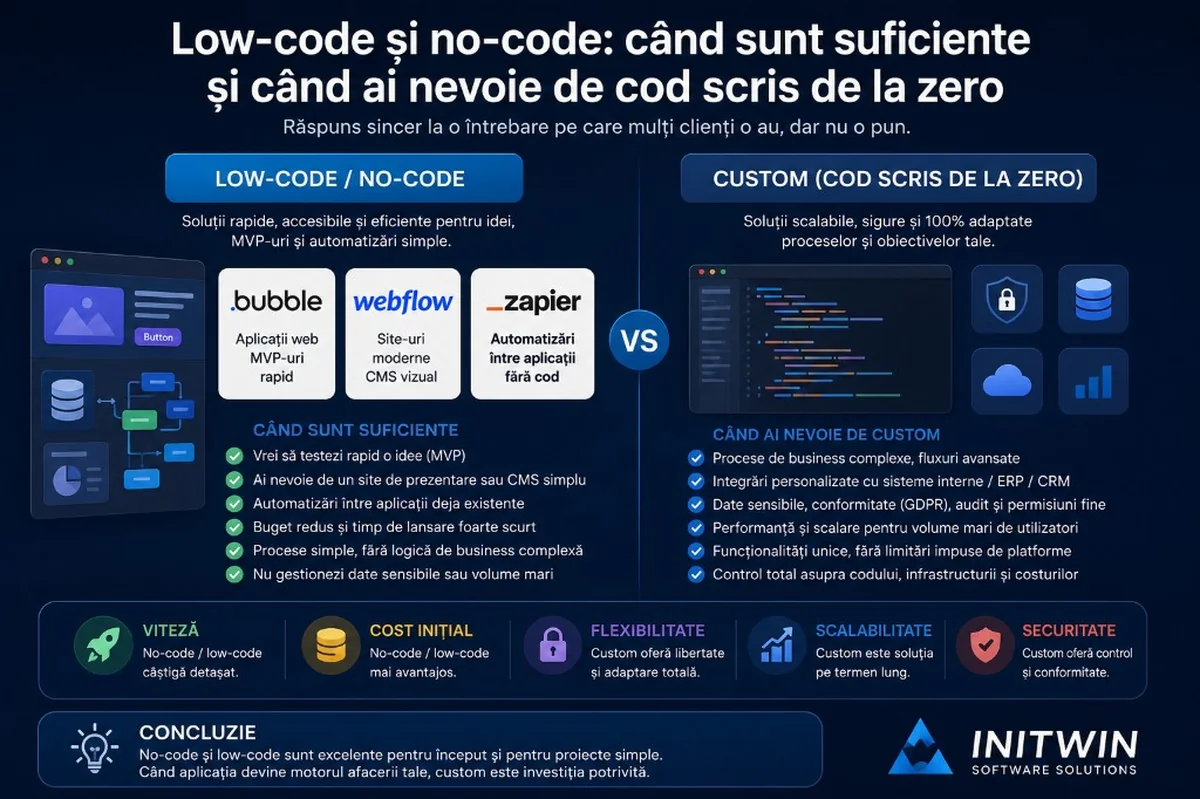
Bubble, Webflow, Zapier — where fast platforms stop and the need for custom software written from scratch begins.
In recent years, low-code and no-code platforms have become increasingly popular. Entrepreneurs often hear about Bubble, Webflow, Zapier, Airtable, Make or other tools that promise applications, websites and automations without classic programming. For many clients, the question arises naturally: if such platforms exist, why would they still invest in custom software written from scratch?
It is a good question. And it deserves an honest answer.
Low-code and no-code can be very good solutions in certain situations. They can reduce initial costs, shorten launch time and help a company quickly test an idea. Not every project needs custom architecture, its own backend, complex infrastructure and traditional software development.
But there are limits too. As the application becomes more important for the business, more serious requirements appear: performance, security, scalability, integration with internal systems, complex business rules, data control, audit, deep customisation and predictable long-term costs.
The right question is not "low-code or custom?", but "what fits the stage and complexity of my project?".
What does no-code mean?
No-code means developing applications, websites or automations without writing code directly. The user works in a visual interface: drags elements onto the page, configures forms, defines automation steps, connects applications and sets rules.
Well-known examples are Webflow for visual websites, Bubble for web applications, Zapier for automations between applications, Airtable for simple databases with a friendly interface, or Make for automated flows.
No-code is useful for people who are not programmers but want to quickly build something functional: a presentation page, a form, a landing page, a prototype, a simple internal application or an automation between two applications.
The main advantage is speed. You can have something functional in days or weeks, not months. For validating an idea, this can be very valuable.
What does low-code mean?
Low-code is close to no-code, but allows more technical intervention. The platform offers visual components, but developers can add code, APIs, integrations or custom logic.
Low-code is often used in companies for internal applications, dashboards, forms, approval flows and business automations. It is an intermediate area between full no-code and custom software development.
The simple difference is this: no-code is designed for non-technical users, and low-code is designed for faster development, but with the possibility of technical intervention.
When is low-code or no-code enough?
Low-code and no-code are enough when the project is clear, relatively simple and does not yet represent the company's critical infrastructure.
For example, if you want to test a startup idea, create a registration form, build a presentation page, automate sending emails or connect a form with a CRM, no-code may be the right choice.
It is also useful when you do not yet know whether the idea deserves investment in a custom product. Instead of building a complete platform from the start, you can create a simple prototype or MVP, test it with real users and see if there is demand.
Another good case is the marketing area. Landing pages, campaigns, forms, event pages, mini-sites and lead capture pages can be built quickly in platforms like Webflow or similar tools.
Simple automations are also an excellent area for Zapier or Make: when someone completes a form, a lead is created in CRM; when a new order appears, an email notification is sent; when a file is added to a folder, a task is created.
For such scenarios, custom development may be overkill.
Webflow: very good for websites, but not for every application
Webflow is a very good platform for modern websites, presentation pages, landing pages, blogs, CMS projects and certain marketing projects. It offers advanced visual control, clean design and the ability to publish quickly.
For a company that wants a corporate website, service presentation, blog or campaign page, Webflow can be an excellent solution. It allows quick changes, professional design and relatively simple content management.
But Webflow is not naturally the ideal choice for complex business applications. If you need advanced roles, operational flows, complex relational databases, documents with permissions, deep ERP/CRM integrations, custom business logic or portals with many rules, you will feel the limits.
In short: Webflow is very good for websites and content. It is not the best choice for a custom ERP, logistics system, medical portal or complex internal application.
Bubble: suitable for MVPs and web apps, but watch scaling
Bubble is one of the best-known no-code platforms for web applications. You can build interfaces, databases, workflows, authentication, dashboards and fairly complex features without classic code.
For an MVP, Bubble can be very useful. You can quickly test a marketplace idea, simple CRM, portal, booking application or SaaS product at the start. For entrepreneurs who want to validate a hypothesis before investing in a custom development team, it can be a good choice.
However, Bubble does not eliminate complexity. It only partially hides it in the visual interface. A serious application in Bubble still needs architecture, logic, data structure, testing, optimisation and security.
Limits appear when the application grows: performance, workload costs, very specific logic, infrastructure control, export/migration, advanced testing, versioning and deep integration with complex systems.
Bubble is good for starting, validation and some functional products. But if the application becomes the operational core of the business, you must carefully analyse whether it remains suitable long term.
Zapier: excellent for automations, not for complex critical processes
Zapier is very useful for connecting applications. You can link forms, CRMs, emails, Google Sheets, Slack, Trello, Notion, marketing platforms and many other tools.
Simple examples:
- a new form sends data to CRM;
- a new lead automatically creates a task;
- a new order sends a notification to the team;
- a new client receives an onboarding email;
- a new invoice is automatically saved in a folder.
For simple and repetitive automations, Zapier can save a lot of time.
The problem appears when flows become critical, complex or hard to verify. If you have dozens of automations dependent on each other, errors hard to track, sensitive data, complicated conditional steps and lack of centralised audit, the system can become fragile.
Zapier is good for quick connections between applications. But it should not become the invisible foundation of the entire operation without a clear architecture.
Advantages of low-code and no-code
- Speed — you can quickly build a first version.
- Lower initial cost — for MVP or simple automations, investment can be significantly lower.
- Autonomy — non-technical teams can modify texts, forms, pages or flows.
- Fast validation — you check whether users really need the product.
- Integration ecosystem — ready-made connections, useful for marketing, sales and simple operations.
Low-code and no-code are very good when speed and validation matter more than complete control.
Limits of low-code and no-code
- Control — you depend on the platform's rules, infrastructure and limitations.
- Scaling — an application with 100 users can become slow or expensive with 10,000.
- Customisation — not every business logic can be implemented elegantly.
- Security and compliance — for sensitive data, GDPR, audit and complex roles, you must analyse whether the platform allows the necessary control.
- Migration — complete export of logic, flows and structure can be difficult.
- Maintenance — a no-code application built quickly can become hard to maintain without documentation.
When do you need code written from scratch?
You need custom software when the application becomes important for company operations, when processes are specific and when the limits of fast platforms become risky.
- Client portal with roles, documents, invoices, notifications, ERP integration and access rules.
- Logistics platform with GPS tracking, dispatch, CMR documents, automatic invoicing and reports.
- Medical system with appointments, electronic records, sensitive data and external integrations.
- Custom CRM/ERP with internal flows, approvals, audit logs, reports and critical data.
- The application is the main product, not just a temporary tool.
Low initial cost vs total long-term cost
A strong argument for no-code is lower initial cost. And it is true: you can start cheaper.
But entrepreneurs should also look at total long-term cost. A no-code platform can have monthly subscriptions, per-user costs, workload, automations, traffic, plugins and specialised consultants.
At first, these costs are small. As the application grows, they can become significant.
In custom development, the initial investment is higher, but you have more control over infrastructure, optimisation and technical direction. The decision should be made over 2–3 years, not just the first month.
Vendor lock-in: platform dependency
Vendor lock-in means you become dependent on a provider. In no-code, this risk is real.
If the application is built entirely on a platform, logic, database, interface and workflows can be hard to move elsewhere. You can sometimes export data, but not necessarily the application itself.
For an MVP, this risk may be acceptable. If the goal is validation, it may not matter that you will rebuild later.
But for a critical application, dependency must be analysed carefully. Custom software does not eliminate all dependencies, but gives you more control.
Security and sensitive data
If the application processes personal, medical, legal, financial or sensitive operational data, technology choice becomes more serious.
You must be able to answer questions such as:
- where is data stored?
- who has access?
- are there audit logs?
- can data be exported, deleted or anonymised?
- is there encryption and backup?
- is there role control and change history?
- how are incidents handled?
No-code platforms can offer many security measures, but you must verify whether they are sufficient for your case. For sensitive domains, custom software can offer better control.
Performance and scalability
A simple application can work well on no-code. But if you have many users, lots of data, many operations or complex reporting, performance can become a problem.
In custom software, the team can optimise the database, caching, queries, infrastructure, APIs and background processes. It can separate modules and scale servers.
In no-code, you have less control. You depend on how the platform manages resources. For small applications, this is not a problem. For large or critical applications, it can become one.
Integration with existing systems
Many companies already have software: ERP, CRM, accounting, invoicing, management, couriers, payments, BI or existing databases.
No-code handles popular integrations well. Zapier, Make and other platforms offer quick connections with many applications.
But when integration is specific, deep or critical, custom becomes more suitable:
- bidirectional synchronisation with ERP;
- complex validations before transfer;
- large data imports;
- poorly documented internal APIs;
- flows with retry, errors and audit;
- special business rules;
- consolidated reports.
No-code can connect applications. Custom can build a robust, controlled integration adapted to the process.
No-code MVP, custom final product: a very good strategy
In many projects, the best strategy is hybrid.
You can start with no-code for the MVP. You test the idea, validate the market, understand users and discover which features really matter.
Then, if the idea works, you rebuild the product custom, with solid architecture.
This approach reduces risk. You do not invest €50,000–100,000 in an untested product. But you also do not stay stuck on a platform that cannot keep up when the business grows.
It is important to know from the start that the no-code MVP can be a temporary stage. Not all MVPs need to be transformed directly into the final product.
How we decide at INITWIN
In a discussion with a client, we should not start from the idea that custom software is always the answer. Sometimes the right recommendation may be Webflow, Bubble, Zapier or an existing SaaS solution.
If the need is simple, the budget is small, the idea must be validated quickly or the project is marketing-related, low-code/no-code may be sufficient.
But if the project involves specific processes, sensitive data, complex integrations, roles, audit, advanced reporting, scaling and long-term control, the recommendation shifts towards custom software.
A serious software company should not sell code where code is not needed. But it must honestly explain where fast solutions end and serious architecture begins.
Questions to ask yourself before choosing
- Is the project a test or a critical system?
- How many users will it have?
- What data does it collect? Is it sensitive data?
- What integrations are needed?
- How complex is the business logic?
- How much will the application grow?
- What happens if the no-code platform becomes too expensive?
- Can I migrate the data?
- Do I need audit, permissions, backup and advanced reporting?
- Do I want to control the infrastructure?
- Do I want to turn the application into a long-term product?
Your answers will show the right direction.
Conclusion
Low-code and no-code are valuable tools. They have democratised digital development and allowed many entrepreneurs to test ideas quickly, with smaller budgets. Webflow can be excellent for websites and CMS projects. Bubble can be very useful for MVPs and web applications at the start. Zapier can quickly automate repetitive processes between applications.
But these tools are not the universal solution.
When the application becomes critical, when processes are specific, when data is sensitive, when integration is complex and when scaling matters, custom software becomes a safer investment.
The right choice is not dictated by fashion. It is dictated by project stage, process complexity, business risks and growth plans.
For some companies, low-code is enough. For others, it is a starting point. And for applications that become the digital infrastructure of the business, code written from scratch offers the control, flexibility and solidity you need long term.
Keep reading
- Why do my emails go to spam? Complete guide to SPF, DKIM, DMARC and server reputation
- How to build your own company email server with Mailcow, without monthly per-user subscriptions
- How to prepare your team for new software: training, adoption and resistance to change
- The 8-week MVP: how to launch a product idea without burning the budget
Need guidance on a similar project or a technical audit?