INITWIN · Editorial
Software & digital strategy
Production application monitoring: how to know something broke before the client does
Logging, alerting, uptime, error tracking and practices that turn maintenance into a real advantage
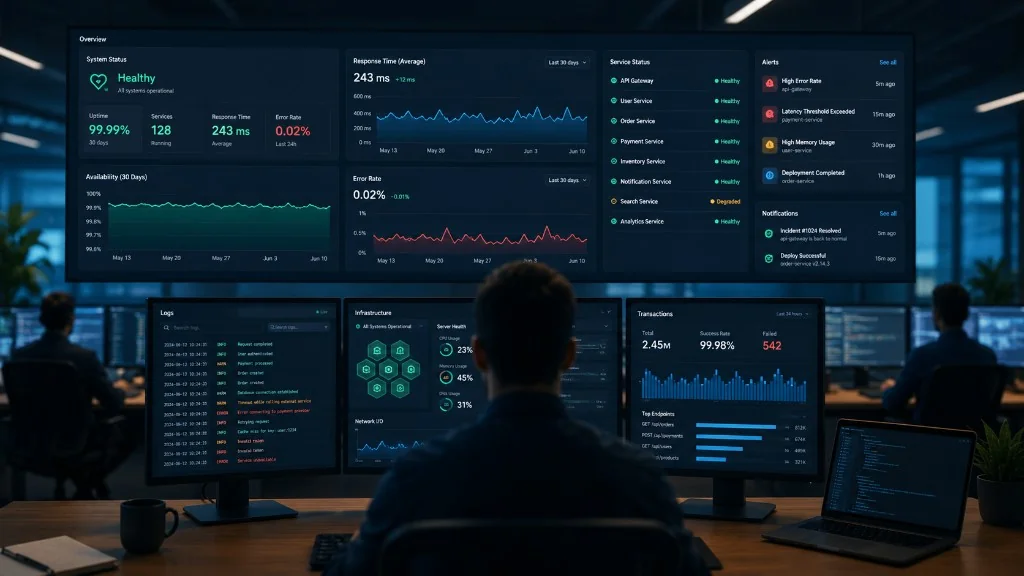
Logging, alerting, uptime monitoring, error tracking and practices that turn maintenance into a real advantage.
A web application is not “done” on launch day. From that moment, production operation begins: real users, orders, reports, integrations, APIs, emails, payments, a database that grows daily.
Everything seems fine until something breaks — slow site, form that does not save, ERP that does not respond, stuck job, 500 error, payment confirmed but order in the wrong status. The user sees the problem first: “The app does not work.” The technical team is already behind.
Production monitoring exists so you find out quickly that something broke — ideally before the client does. For business applications, it is not a technical luxury: it is maintenance, support and operational continuity.
What production monitoring means
Constant tracking of the live application: servers, databases, APIs, errors, logs, response times, uptime, jobs, integrations, queues, disk, memory, SSL certificates and alerts.
An app can work perfectly in test and have problems in production because of volume, traffic, external connections or user behaviour. Monitoring answers: is the app online? Does it respond quickly? Are there new errors? Which endpoints are failing? Is the database slow? Are jobs running? Did backup run? Is SSL expiring soon?
“It works” vs. “it is healthy”
If the homepage loads, many conclude everything works. But login may be broken, the report may not generate, notifications may not send, the API may respond very slowly, or the database may be nearly full. Monitoring must check real health, not just whether the domain responds.
Uptime monitoring: the first line of defence
An external service periodically sends requests to the site, API or important endpoints. If there is no response or an error is returned, you get an alert.
- homepage, login, main API;
- health check that also verifies DB, cache, critical jobs;
- SSL, response time, HTTP status codes;
- availability from multiple regions.
For critical applications, uptime monitoring is mandatory. You do not want to learn from the client that the site is down.
Error tracking
Automatic capture of production errors — instead of guessing after “I got an error”. The system can show: the exact error, file and line, endpoint, frequency, time, application version, context (without unnecessary sensitive data).
Many bugs stay invisible: users do not report, give up or assume the app is poor. With error tracking, the team sees errors immediately and prioritises them — an error in checkout or payment is more urgent than one on a secondary page.
Logging: the application journal
Logs show what happened, when and where: order creation, external API response, job run, request that caused the problem. Essential for debugging, audit, security and support.
Do not store passwords, tokens, card data or national IDs without reason — logs can contain personal data. A good system has: levels (info, warning, error), structured format, request correlation, fast search, controlled retention, role-based access, alerts on critical errors.
Smart alerting
Too many minor alerts lead to alert fatigue — the team ignores notifications. A good alert is clear, actionable, prioritised, sent to the right person, with context and tied to real impact.
Complete application outage = immediate alert. Database nearly full = quick intervention. Payment integration down = critical for an online store. Delayed email = important, but contextual.
Useful alert examples
- application or login not responding;
- rise in 500 errors, response time above threshold;
- disk full, SSL expiring, backup failed;
- sync job not run, payment API unavailable;
- failed transactional emails, abnormal message queue;
- high CPU/memory, errors in business flows.
Priorities differ: medical portal, online store, internal CRM — alerts are adjusted per application.
Performance, databases and jobs
Performance: page/API response time, slow SQL, reports, file uploads, external services. A good system shows where it is slow — DB, code, external API, frontend.
Database: space, connections, slow queries, locks, replication, backup, indexes, table growth. Many problems appear after months of accumulated data.
Automated jobs: backup, ERP sync, emails, invoices, import/export, notifications, stock. The store may “work”, but stock no longer syncs. Questions: did it run? when? how long? errors? did it get stuck?
External integrations
Payments, ERP, CRM, couriers, SMS, email, e-invoicing, cloud storage — if an external service goes down, your app is affected even if your server is OK. Monitor: response time, error rates, timeouts, failed webhooks, rate limits. Good integration has logs, retry, alerting and a dashboard.
Status page and incident management
A status page shows service state (web, API, payments, notifications, maintenance). It reduces support pressure and builds trust. For SaaS — public; for internal — private.
Incident management: when an alert arrives, it must be clear who investigates, who decides severity, who communicates, how it is documented and how resolution is confirmed. Simple process: alert → investigation → fix → verification → post-incident note → preventive measures.
Tools and indicative costs
Uptime: UptimeRobot, Better Stack, Pingdom, StatusCake. Errors: Sentry. Logs/metrics: Grafana, Prometheus, Loki, Elastic, Datadog. Choose based on what you monitor and who responds — not just popularity.
- Small app: uptime + entry-level error tracking — tens of €/month;
- Mid-size business: uptime, errors, logs, dashboards — hundreds of €/month;
- Critical: on-call, SLA, status page, retention — €500–2,000+/month.
A tool without someone watching alerts does not solve the problem. Value comes from configuration, interpretation and response.
Monthly maintenance and health report
Serious maintenance includes proactive monitoring: uptime, errors, security, backups, logs, performance, jobs, incident support. Monitoring provides the data; maintenance turns it into action.
A monthly report for the client can include: uptime, incidents, response time, critical errors resolved, failed jobs, backups, updates, recommendations, risks. It changes perception: the client sees what is monitored and what was prevented.
What to monitor by application type
Marketing site: uptime, SSL, forms, backup, server errors.
Online store: login, cart, checkout, payments, emails, stock, courier, product performance.
Client portal: authentication, documents, notifications, APIs, jobs.
Financial / medical: audit logs, backup, access, critical flow errors, integrations, compliance.
Monitoring adapts to the business — it is not copied generically.
Monitoring in an INITWIN project
In custom projects, monitoring can be defined from design: health checks, Sentry or equivalent, structured logs, alerts on critical flows, backup and job monitoring, monthly client report, simple incident procedure.
Common mistakes
- only the homepage monitored;
- login, payments or critical flows ignored;
- alerts to email that nobody reads;
- too many unimportant alerts (alert fatigue);
- no centralised logs or job/backup monitoring;
- no incident owner or monthly reporting;
- monitoring treated as a one-off project, not ongoing practice.
Checklist for managers
- Do we know immediately if the app goes down or if login/payments/emails work?
- Do we know what errors occur and how many users are affected?
- Do we have centralised logs, clear alerts, monitored backups?
- Who receives alerts and who responds?
- Do we get a monthly health report?
If the answers are unclear, the application is not monitored enough.
Conclusion
Monitoring is the difference between late reaction and proactive control. Uptime tells you if it is available; error tracking what errors occur; logging the history; alerting the signals; performance where it is slow; incident management turns the alert into action.
An app launched without monitoring is like a shop with no alarm and no one on duty. With monitoring and monthly maintenance, the application becomes safer and more predictable. The best incident is the one the client never notices.
Keep reading
- Why do my emails go to spam? Complete guide to SPF, DKIM, DMARC and server reputation
- How to build your own company email server with Mailcow, without monthly per-user subscriptions
- How to prepare your team for new software: training, adoption and resistance to change
- The 8-week MVP: how to launch a product idea without burning the budget
Need guidance on a similar project or a technical audit?