INITWIN · Editorial
Software & digital strategy
How we built a multi-channel notification system for a platform with 50,000 users
Case study: email, SMS, push, scalability, retry, user preferences and monitoring
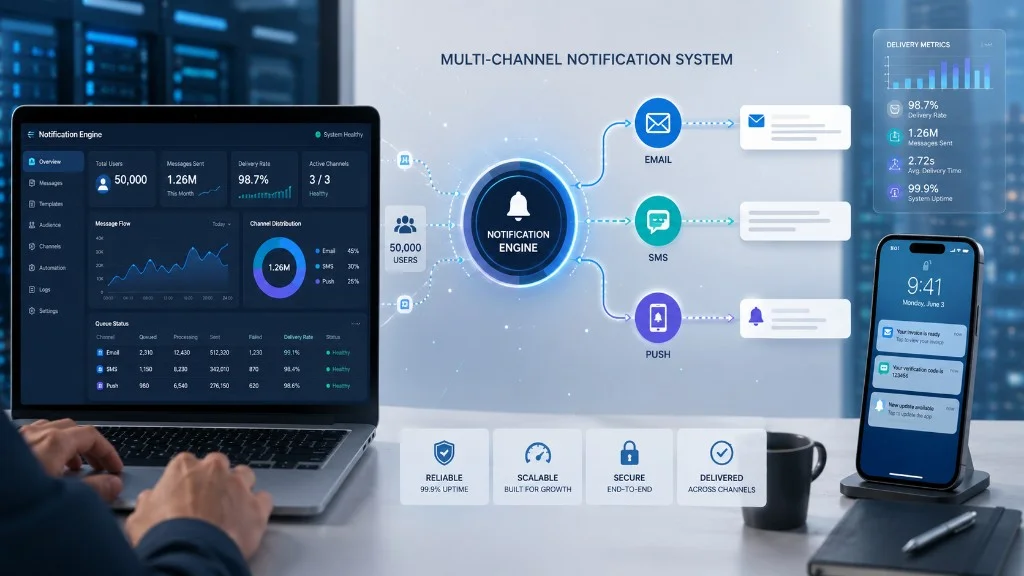
A technical-narrative case study: email, SMS, push notifications, scalability, retry, user preferences and monitoring.
A notification system looks simple at first glance. You send an email, send an SMS, send a push notification and the user receives the message. In reality, on a platform with tens of thousands of users, notifications quickly become one of the most sensitive components of the application.
If the notification does not arrive, the user may miss an appointment, a payment, an order, a security alert or an important action. If it arrives too late, its value drops. If it arrives twice, the user loses trust. If too many messages are sent, the platform becomes annoying. If there are no logs, the support team cannot answer the simple question: “Why didn’t I receive the notification?”
This case study presents how we designed and implemented a multi-channel notification system for a platform with over 50,000 users. The client’s name and certain operational details have been anonymised, but the problems, architecture and solutions reflect real challenges found in business applications that need fast, scalable and controlled communication.
The system had to send notifications through three main channels: email, SMS and push notifications. In addition, it had to respect user preferences, support large volumes, handle errors, prevent duplicates and give the internal team full visibility into sent messages.
Project context
The client operated a digital platform with daily active users. The platform included user accounts, transactional actions, documents, statuses, important events and frequent interactions between users and the system.
Before the project, notifications were implemented directly in several areas of the application. When an event happened, the code sent the email or SMS directly from that flow. At the beginning, this approach worked acceptably. As the platform grew, the problems became more visible.
Some notifications were delayed. Others were sent twice. Sometimes, if the SMS provider did not respond, the main process was slowed down. The support team could not easily check whether a message had been sent, delivered or rejected. Templates were hard to update. User preferences were not managed in a unified way. And adding a new channel meant changes in many areas of the application.
The client did not only need “send email and SMS”. They needed a communication infrastructure.
The initial problem
The main problem was the lack of a dedicated architecture for notifications.
The main application was doing too many things at once: processing business actions, saving data, sending messages, handling communication errors with external providers and trying to keep notification history.
This approach had several risks.
First, performance was affected. If sending an SMS took longer, the user could feel delay in the application.
Second, reliability was reduced. If an external provider was temporarily unavailable, the notification could fail without a clear retry mechanism.
Third, observability was weak. There was no clear panel where the team could see which notifications had been scheduled, sent, delivered, failed or resent.
Fourth, maintenance became difficult. Each new notification type required new code in the main application, and the logic was spread across multiple modules.
Fifth, there was no unified preference policy. A user might want email for certain events, SMS for critical events and push for fast updates. The old system could not handle these options elegantly.
Project objectives
In the analysis stage, we defined a few clear objectives together with the client.
- Separation — sending messages should not block the platform’s important flows.
- Scalability — traffic peaks, campaigns and massive events in a short interval.
- Reliability — retry without duplicates when a message fails.
- Multi-channel — email, SMS and push through a common architecture.
- Personalisation — preferences by channel and event type.
- Traceability — a fast answer to “was it sent?”, “on which channel?”, “what error?”.
- Security — no unnecessary exposure of sensitive data, especially on SMS and push.
The proposed solution
We proposed building a centralised notifications module, logically separated from the rest of the application. It would receive events from the platform, decide which notifications to generate, apply user preferences, choose the right channel, send messages through available providers and keep the full history.
The proposed architecture had several main components:
- event system;
- message queue;
- dedicated processing workers;
- template engine;
- user preferences module;
- connectors for email, SMS and push;
- retry mechanisms;
- notification journal;
- internal monitoring dashboard;
- alerts for errors and unusual volumes.
The central idea: the main application no longer sends notifications directly. It publishes an event, and the notification system handles the rest.
From direct actions to an event-driven architecture
In the old system, the logic was: “X happened, send the email now.”
In the new architecture, the logic became: “X happened, publish the event in the system.”
For example: the user creates an account; an order is confirmed; a document is available; a payment is processed; an important deadline approaches; a status changes; a security action takes place.
Each of these situations generates an event. The notification system receives the event and decides which messages are needed.
This separation brought a major advantage: the main application became cleaner, and notifications could evolve independently. If a new channel is added, the whole application does not need to change. If a template changes, you do not need a full redeploy for every flow. If an external provider has problems, the main process is not directly affected.
Message queues and workers
For scalability, we introduced a message queue. Instead of processing notifications immediately in the user request, events are placed in a queue and workers process them asynchronously.
This decision was critical for performance. If 10,000 users must be notified in a short interval, the main application should not send 10,000 SMS messages or emails directly. It generates events, and workers process the batches in a controlled way.
Workers can be scaled. If volume grows, you start more processing instances. If volume drops, you reduce resources.
In addition, the queue provides resilience. If an external provider is temporarily unavailable, messages are not lost. They stay in the system and can be resent according to defined rules.
Centralised templates
Another important problem was template management. In the old system, notification texts were scattered in code. Changing a message required technical intervention and risk of inconsistency.
We created a centralised template engine. Each notification type had a separate template for email, SMS and push. For example, the “order confirmed” notification had:
- email template, with full text and design;
- SMS template, short and direct;
- push template, very concise;
- dynamic variables (user name, order code, date);
- versions and statuses;
- ability to activate/deactivate.
This approach allowed the team to manage messages more easily and keep consistency across channels. We introduced clear rules: SMS does not contain sensitive data, push does not expose confidential information on the phone screen, and email may include details only when justified.
Notification preferences for users
On a platform with 50,000 users, not everyone wants to receive the same messages on the same channels.
We implemented a preferences module that allows configuring notifications by event type and channel. For example:
- email for reports and documents;
- SMS for critical alerts;
- push for fast updates;
- disable for promotional notifications;
- mandatory channels for security notifications.
Not all notifications should be optional. Some transactional or security messages must be sent regardless of commercial preferences, depending on the nature of the platform and applicable rules.
A marketing notification does not have the same regime as a security alert or an important account confirmation.
Email, SMS and push: different channels, different rules
One of the most important things in the project was understanding that each channel has its own rules.
Email is suitable for detailed messages: confirmations, documents, reports, instructions. It is relatively cheap and flexible, but can land in spam or be ignored.
SMS is suitable for short and urgent messages: codes, alerts, important confirmations. It is more expensive and must be used carefully.
Push notification is suitable for a fast reaction in mobile or web apps, but depends on user permissions and the device.
We defined rules for each channel: when it is used; what type of message it allows; what limitations it has; what data it may contain; how failures are handled; when fallback to another channel happens.
For example, if a critical push notification cannot be delivered, the system can send SMS or email, according to defined rules.
Retry, fallback and preventing duplicates
A serious notification system must assume that some messages will fail. The SMS provider may time out. The email server may temporarily reject the message. The push token may be expired. The network may have delays.
We implemented retry mechanisms with different rules per channel. Not all messages should be resent the same way. For some notifications, a fast retry is useful. For others, a resend after a few minutes is enough. For permanent errors, such as an invalid phone number, retry does not make sense.
We also introduced idempotency. Each notification has a unique identifier, and the system checks whether the message has already been processed. That way, if the same event arrives twice, we do not send the same notification twice.
Nothing is more annoying than a system that sends the same alert three times.
Rate limiting and abuse protection
At 50,000 users, you must watch not only delivery, but also volume. A bug or a wrong configuration can generate too many notifications — the same alert to thousands of users or waves of expensive SMS messages.
We introduced rate limiting and operational protections:
- notification limit per user within an interval;
- limit by event type and by channel;
- automatic stop for unusual volumes;
- alerts to the technical team;
- pause mode for a specific template;
- approvals for campaigns or mass sends.
Observability: dashboard for the internal team
One of the most appreciated results was the internal notifications dashboard. The team could see scheduled, sent, delivered, failed and retrying notifications, provider errors, volume by channel and by event type, estimated SMS cost, average processing time, the message queue and blocked messages.
For support, user search was introduced. If a client said “I didn’t receive the SMS”, the team could quickly check whether the message was generated, sent, rejected, resent or blocked by preferences.
This visibility greatly reduced investigation time.
Security and data protection
Notifications can expose data if they are not designed carefully. An SMS can be read by someone with access to the phone. A push notification can appear on the lock screen. An email can be forwarded.
We applied the data minimisation principle. Short messages do not contain sensitive information — they direct the user to the platform, where they authenticate and see the full information.
We introduced rules for templates, logs and payloads. Sensitive data is not saved unnecessarily in logs, and access to the notifications dashboard is controlled by roles. For security notifications, we separated marketing and transactional messages, so that commercial preferences do not block important account alerts.
Testing the system
Testing a multi-channel notification system is more complex than it seems. You do not only test whether an email arrives. You test scenarios such as: user with valid email; invalid phone; no push token; SMS provider unavailable; duplicate event; disabled template; channel preference disabled; fallback; retry after timeout; high volume; critical vs promotional message; inactive user.
We built tests for the main flows and ran volume tests before launch. We checked worker behaviour under load, so the system could process peaks without affecting the main application.
Controlled launch
We did not launch the system for all users on day one. We started with a limited group of events and users. We monitored delivery, errors and processing times. Then we gradually expanded notification types and channels.
In parallel, we kept certain old mechanisms as fallback for a short time, until the new system was fully validated.
Results
After implementation, the platform gained a more stable, more scalable and easier-to-administer notification infrastructure.
- notification sending was separated from the main application;
- response time for important flows improved;
- notifications became traceable;
- the support team could quickly check message status;
- duplicates were reduced through idempotency;
- external provider errors were handled through retry;
- templates became centralised;
- user preferences were respected;
- SMS costs could be monitored better;
- adding a new notification type became faster;
- the system could handle large volumes without blocking the application.
Perhaps the most important result was the increase in operational confidence. The team no longer treated notifications as a black box. It had visibility, control and intervention tools.
Lessons learned
- Notifications must be treated as infrastructure, not as a minor feature.
- Do not send notifications directly from critical flows if volume can grow.
- Each channel has different rules and must be managed separately.
- Without idempotency, you will have duplicates.
- Without logs and an internal dashboard, support will work on assumptions.
- Retry must be designed intelligently, not applied mechanically.
- SMS must be used carefully — it has a cost and can annoy the user.
- Notifications must not expose sensitive data.
- Staged launch is safer than abrupt migration.
- A good notification system becomes a foundation for many future features.
What can be added later
After the first version, the system can be extended with: A/B testing for templates; more detailed preferences by category; an in-app notification centre; scheduled notifications; segmented campaigns; engagement analysis; intelligent prioritisation; automatic fallback between providers; multi-provider for SMS and email; cost reports by channel; CRM integration; behaviour-based automations.
A good architecture allows these extensions without a full rewrite.
Conclusion
Building a multi-channel notification system for a platform with 50,000 users does not mean only integrating with an email, SMS or push provider. It means architecture, scalability, reliability, preferences, retry, security, observability and operational control.
Notifications are one of the main bridges between the platform and the user. If they are delivered correctly, the user is informed, processes move faster and the internal team works more efficiently. If they are delivered poorly, confusion, frustration and operational costs appear.
In this project, the solution was separating notifications into a dedicated system based on events, queues, workers, centralised templates, user preferences and monitoring. The result was a more scalable platform and a team with more control.
For companies that are growing, notifications should not be treated as a detail. They are part of the business’s digital infrastructure. And when users are many, channels are multiple and messages are important, architecture makes the difference between a fragile system and an enterprise-ready one.
Keep reading
- Qualified electronic signature in business applications: how to integrate it and what legal effect it has
- Artificial Intelligence in a Document Management System: from archiving documents to understanding information
- Why approval workflows and notifications matter in a DMS for an organisation
- Software for dental practices: online booking, digital patient records and automatic reminders
Need guidance on a similar project or a technical audit?