INITWIN · Editorial
Software & digital strategy
Software for construction companies: from estimating to reporting — what to automate first
Bills of quantities, materials management, works tracking and reports for clients
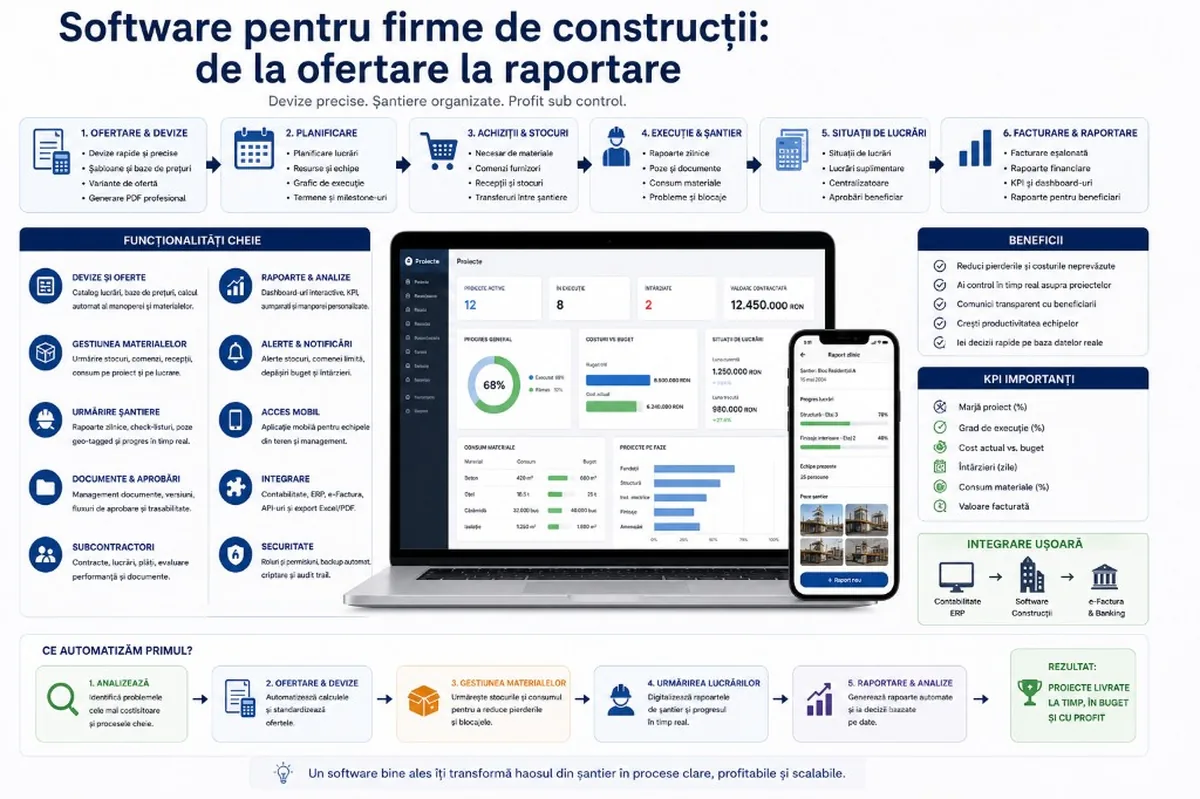
Bills of quantities, materials management, works tracking and reports for clients — what to automate first in a construction company.
Construction is one of the fields where the gap between plan and reality can become very expensive. A wrongly calculated offer, a superficially estimated material quantity, a delay not communicated in time or an incomplete progress statement can affect the profitability of the entire project.
In many construction companies, activity is managed through Excel, WhatsApp, email, site photos, PDFs, phone calls and local files. For small projects that may seem enough. With more sites, subcontractors, teams and materials, the lack of a digital system starts to cost.
Construction software can link estimating to execution, execution to material consumption, costs to works progress and reporting to the client. The important question is not only “what software do we need?”, but what do you automate first.
Why construction needs digitisation
A company works with people, materials, equipment, subcontractors, deadlines, permits, documents, bills of quantities, progress statements, invoices, client change requests and unexpected conditions. Without a clear system, information scatters: the engineer has one version, accounting another, the client a separate PDF, the site manager communicates through photos.
Digitisation centralises: offers, estimates, quantities, materials, teams, stages, documents, reports, statuses. Good software organises people’s experience — faster decisions, fewer administrative errors.
Where money is lost in a construction company
Losses accumulate quietly: material ordered wrongly, supplier price not updated, offer based on an old estimate, extra work not invoiced, undocumented delay, blocked equipment, unclear overtime in the report.
Software provides visibility: where the project is, what was consumed, what was executed, what comes next, what has drifted, what you communicate to the client.
First area to automate: estimating and bills of quantities
For many companies, this is the logical first step — here profitability is decided before execution. A good offer: quantities, prices, labour, materials, equipment, subcontractors, margin, taxes, deadlines, conditions.
A system can help with:
- creating offers quickly;
- standardised templates;
- updating material prices;
- calculating labour and commercial margin;
- comparing variants;
- professional PDFs;
- offer history;
- turning an accepted offer into an active project.
Pitfall: digitising chaos — if estimates are unclear in Excel, moving them into software does not fix that. Define categories, offer structure, calculation method, responsibilities.
The bill of quantities as the link between offer and execution
Offer and execution should not be treated separately. The bill of quantities can become the working base: each item linked to executed quantities, materials consumed, real costs, progress statements.
Permanent comparison: what was offered vs executed vs consumed vs invoiced vs differences. Essential for profit control.
Second area: materials management
Common problems: late orders, excess, unclear stock, gap between needed and consumed, transfers without records, different supplier prices, invoices that do not match receipts.
The system manages: project requirements, orders, receipts, consumption, transfer between sites, stock. Example: requirement for a stage → what is in stock → what is ordered → delivery date → project association → consumption tracking.
Tracking works on site
Progress by phone and photos is useful in the moment, hard to centralise. Daily/weekly report: works executed, teams, materials consumed, problems, photos.
- digital site diary;
- status by works, executed quantities;
- observations, blockers, material needs;
- team attendance, equipment.
The information stays linked to the project — for decisions, justifications, invoicing, reporting.
Progress statements and reporting to the client
Centralising quantities, photos, documents, stages, deviations, extra works — manual = delays and errors; digital = generation from existing data.
Reports: progress statements, progress, photos, quantity summaries, approval documents, cost by stage. Different audiences: management (costs, margins) vs client (progress, stages, clarity).
Automating approvals
Offers, material orders, extra works, subcontractor payments, project changes, statements to the client — if approved verbally/by email, you lose traceability.
Flows: order above a threshold → manager approval; extra work → approval before execution; statement → internal check before sending.
Subcontractor management
What was ordered, executed, approved, invoiced? Warranties, documents? Tracking by projects, contracts, statuses, payments, performance — useful when coordinating external teams.
Documents, versions and traceability
Contracts, offers, bills of quantities, drawings, permits, minutes, statements, invoices, photo reports, certificates, warranties. The problem: different versions — an old drawing, a revised offer, an approval unknown on site.
Digital system: documents per project, versions, statuses, permissions, latest version, who uploaded/approved. Commercial and legal protection.
Dashboards for management
- active / delayed projects;
- contracted value, estimated vs actual cost;
- materials consumed, statements sent/approved;
- invoices issued/uncollected, extra works;
- estimated margin, blockers, team performance.
What do you automate first?
| Stage | Area | When it makes sense |
|---|---|---|
| 1 | Estimating & bills of quantities | Manual offers, many price versions, hard offer-vs-execution comparison |
| 2 | Materials management | Losses, unclear stock, supply delays |
| 3 | Site tracking | Daily report, photos, quantities, problems |
| 4 | Client reporting | Progress statements, approvals, administrative work |
| 5 | Dashboard & analysis | Subcontractors, finance, advanced automations |
Do not automate everything from day one — a project that is too large is hard to adopt. Start with the area of immediate impact.
Standard software or a custom application?
Standard — simple processes, a good fit with an existing application.
Custom — specific flows, project types, personalised reports, accounting integration, internal approvals, client reporting.
Hybrid — existing accounting/estimating software + a custom platform for flows, reporting, integration.
Pitfalls in digitising construction companies
- technology before processes;
- a system that is too complex from v1 — the site wants simplicity;
- incorrect data (prices, work codes, estimate structure);
- ignoring mobile (phone/tablet on site);
- lack of post-launch support.
What a realistic implementation looks like
Analysis with management, estimating, purchasing, site managers, accounting → v1 with projects, bills of quantities, materials, site reports, documents → expansion to statements, approvals, dashboard, integrations. Involve the site early; training is as important as development.
Conclusion
Digitising construction companies has huge potential — a lot of information, documents, operational risks. From estimating to reporting: clear bills of quantities, tracked materials, monitored sites, statements generated quickly, organised documents.
Do not automate everything at once. For many companies: estimating and bills of quantities → materials → works tracking → client reporting. Good software must be practical, adapted to the real way of working and flexible for growth.
Keep reading
- Why do my emails go to spam? Complete guide to SPF, DKIM, DMARC and server reputation
- How to build your own company email server with Mailcow, without monthly per-user subscriptions
- How to prepare your team for new software: training, adoption and resistance to change
- Qualified electronic signature in business applications: how to integrate it and what legal effect it has
Need guidance on a similar project or a technical audit?