INITWIN · Editorial
Software & digital strategy
How we digitised a law firm’s processes: case study
From manually managed files to an internal platform for documents, deadlines, clients and reporting
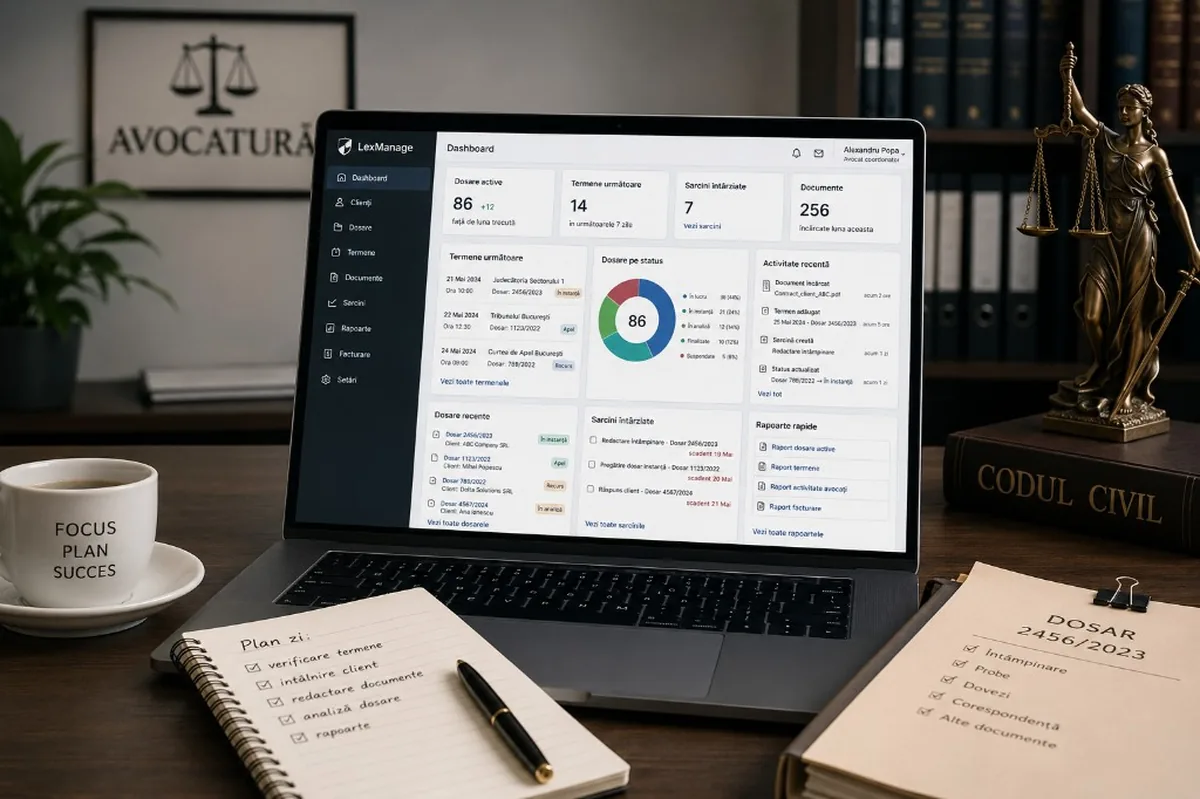
From manually managed files to an internal platform for documents, deadlines, clients and reporting.
Digitising a law firm does not start with technology. It starts with a very concrete problem: too much important information is scattered across emails, folders, Word files, diaries, conversations and printed documents.
In a field where deadlines, documents and confidentiality are essential, the lack of a well-organised digital system can become an operational risk. A missed deadline, a document saved in the wrong place, an old version sent to the client or a message lost in an email thread can affect not only the firm’s efficiency, but also client trust.
This case study presents how we approached process digitisation for a mid-sized law firm. The client’s name and certain operational details have been anonymised, but the problem, solution and results reflect common situations found in law firms and practices that want to work in a more organised, secure and efficient way.
Client context
The client was a law firm with a team of lawyers, collaborators and administrative staff. The activity included legal consulting, litigation, contracts, court representation, relationships with corporate clients and managing a large volume of documents.
The firm was not without digital tools. It used email, shared folders, Excel files, Word documents, calendar apps and cloud storage. The problem was that these tools did not form a unified system.
Each lawyer had their own way of organising work. Some cases were tracked in Excel, others in email, others in local folders. Deadlines were noted in different calendars. Documents had multiple versions. The status of a case was known by the responsible lawyer, but was not always visible to the coordinator or the administrative team.
As the number of clients and cases grew, this way of working started to create bottlenecks.
The initial problem
In the first discussion, the client did not ask for “a complex application”. They asked for something much simpler: order.
The firm needed an internal platform where it could quickly see clients, cases, documents, deadlines, tasks and statuses. It did not want to completely replace how lawyers worked, but to eliminate operational chaos.
The main problems were:
- documents were stored in multiple places;
- deadlines were tracked manually;
- there was no clear view of all active cases;
- client reports were prepared manually;
- internal tasks were communicated by email or verbally;
- document versions were hard to track;
- there was no clear activity log per case;
- management had no dashboard for workload;
- administrative staff wasted time searching for information;
- there was no clear separation of access by role.
These problems were not caused by a lack of professionalism. They were the result of growth. The firm had evolved, but internal processes had remained at the level of a smaller team.
Project objectives
In the analysis stage, we defined several clear objectives together with the client.
The first objective was centralising information. Every client, case, document, deadline and activity had to be easy to find in a single system.
The second objective was reducing the risk of missed deadlines. For a law firm, deadlines are critical. The system had to allow notifications, responsibilities and visibility.
The third objective was document organisation. Each case had to have its documents, with types, versions, statuses and access rules.
The fourth objective was reporting. The firm wanted to generate internal reports quickly and, in some cases, reports for clients.
The fifth objective was security. Legal data is sensitive. The application needed roles, permissions, secure authentication and an activity log.
The sixth objective was simplicity. Lawyers did not want yet another complicated application, but a tool that would help them work faster.
The discovery stage
We started with a discovery stage. We did not jump straight into development, because the risk was building an application that looked good but did not reflect the firm’s real workflows.
We spoke with the coordinating lawyer, two collaborating lawyers and the administrative staff. Each had a different perspective on the problems.
The coordinator wanted visibility over cases and workload. Lawyers wanted fast access to documents, deadlines and activity history. Administrative staff wanted to reduce time spent organising files, scanning, searching for documents and preparing reports.
In this stage we analysed:
- how a new case is created;
- how documents are associated;
- how deadlines are tracked;
- how the team communicates internally;
- how reports are prepared;
- what data must be protected;
- what roles need to exist;
- what document types appear frequently;
- what information is mandatory for each case.
Discovery clarified an important point: the application should not be only a document archive. It had to be an operational system for daily work.
The proposed solution
We proposed developing a secure internal web platform, with clear modules and phased implementation.
The first version included the following modules:
- client management;
- case management;
- documents and versions;
- deadlines and notifications;
- internal tasks;
- activity log;
- management dashboard;
- basic reports;
- roles and permissions;
- quick search.
We chose a modular approach so the application could grow over time. We did not try to build everything in the first stage. We prioritised the features that solved the biggest problems: cases, documents, deadlines and visibility.
The clients module
The first module was clients. Each client had a digital profile with general data, contacts, associated cases, relevant documents and activity history.
For corporate clients, the system allowed adding multiple contacts: administrator, legal contact, accountant, project manager or other relevant people.
The goal was not only storing contact data, but connecting the client with all legal work done for them. This way, the team could quickly see:
- what cases the client has;
- who the responsible lawyer is;
- what deadlines are coming up;
- what documents were generated;
- what recent activities exist;
- what status each case has.
The cases module
The cases module became the centre of the application. Each case had an internal code, associated client, case type, responsible lawyer, status, deadlines, documents, tasks and notes.
We defined clear statuses, such as:
- new;
- under analysis;
- in progress;
- waiting for documents;
- in court;
- completed;
- archived.
These statuses gave management a quick view of activity. Instead of asking each lawyer what was happening with a case, the coordinator could see the status directly in the platform.
For each case, the application kept an activity log. Any uploaded document, added deadline, created task or changed status was recorded. This traceability was one of the most appreciated features, because it provided clarity and accountability.
The documents module
Before digitisation, documents were one of the biggest sources of disorder. There were different folders, inconsistent names and versions that were hard to track.
We built a documents module associated with each case. Documents could be uploaded, classified and linked to a client or case.
The system allowed document types such as:
- contracts;
- applications;
- statements of defence;
- notices;
- letters;
- judgments;
- evidence;
- client documents;
- internal documents;
- reports;
- correspondence.
We also introduced a simple versioning rule. Instead of the team saving files with names like “contract_final_final2.docx”, the document had versions in the system, with date, author and notes. This change reduced confusion and made it easier to check which was the latest valid version.
Deadlines and notifications
For the firm, deadlines were the highest-risk area. We built a dedicated deadlines module, linked to cases and responsibilities.
Each deadline had:
- date;
- time, if applicable;
- deadline type;
- associated case;
- responsible person;
- status;
- notes;
- notifications.
The system sent alerts before the deadline, based on rules agreed with the client. For example, for certain important deadlines, a notification could be sent 7 days, 3 days and 1 day in advance.
We avoided excessive notifications. The goal was not to bombard the team with alerts, but to reduce the real risk of omission. In the dashboard, upcoming deadlines were immediately visible. Each lawyer saw their own deadlines, and the coordinator had an overall view.
Internal tasks and collaboration
A legal case often involves multiple activities: drafting, review, requesting documents, filing, client communication, preparing a report or analysis.
Before the platform, these tasks were communicated by email, messages or verbally. We introduced a simple task management module adapted to legal work.
Each task could be associated with a case and had an owner, internal deadline, status and comments. This feature reduced dependence on emails and allowed activities to be tracked in the context of the case.
Management dashboard
For the coordinating lawyer, we built a dashboard with essential indicators:
- active cases;
- cases by status;
- upcoming deadlines;
- overdue tasks;
- recently uploaded documents;
- activity by lawyer;
- active clients;
- completed cases;
- cases waiting for documents.
The dashboard was not designed as a decorative tool. It was designed as an operational map of the firm. Instead of management learning about problems late, it could quickly see where bottlenecks existed: cases without recent activity, upcoming deadlines, overdue tasks or missing documents.
Security and access control
For a law firm, confidentiality is essential. That is why security was included from the beginning, not added at the end.
We defined roles such as:
- administrator;
- coordinating lawyer;
- collaborating lawyer;
- administrative staff;
- limited-access user.
Each role had different permissions. Not all users could see all documents or modify all data.
The system kept logs for important actions: document upload, status change, deadline creation, deletion, client data updates. We included secure authentication and access rules adapted to the firm’s needs.
Implementation
Implementation was done in phases.
- First stage: main structure — clients, cases, documents and users. The firm could start testing on a limited number of cases.
- Second stage: deadlines, notifications and internal tasks.
- Third stage: dashboard and reports.
- Fourth stage: adjustments based on user feedback.
This approach was important. If we had built everything before the team tested the application, we would have risked developing unnecessary or overly complex features. Through gradual testing, we discovered what truly matters to users.
For example, initially the team wanted many fields for each case. After testing, we reduced some fields and simplified the interface. In daily work, speed was more important than collecting excessive data.
Data migration
The firm already had data in folders, Excel and existing applications. We did not migrate everything automatically from day one, because the data was not standardised enough.
We chose a controlled migration. Active cases were entered into the system first. Important documents were uploaded and classified. Old cases were kept in a separate archive and were to be migrated gradually only if needed.
This decision reduced risk and accelerated launch. Instead of delaying the project for months for a complete migration, we quickly put the system into operation for current work.
Team training
Good software can fail if people do not use it. That is why training was an important stage.
We organised short, role-oriented sessions. Lawyers learned how to work with cases, documents, deadlines and tasks. Administrative staff learned how to create clients, organise documents and prepare reports. The coordinator learned how to use the dashboard and filters.
We focused on real scenarios, not theoretical presentations of features:
- how to create a new case;
- how to add a deadline;
- how to attach a document;
- how to check activity on a case;
- how to see what deadlines are coming this week;
- how to identify overdue tasks.
This approach increased the adoption rate.
Results
After implementation, the firm achieved much better organisation of its work. The most important results were:
- information about clients and cases was centralised;
- documents became easier to find;
- deadlines were tracked more reliably;
- management gained visibility over active cases;
- internal tasks became clearer;
- reports could be generated faster;
- time wasted searching for information decreased;
- the risk of using the wrong document version was reduced;
- the administrative team worked in a more organised way;
- the firm obtained a digital foundation for future developments.
Perhaps the most important result was the change in the way of working. Information was no longer dependent on one person’s memory or a local folder. It was available in the system, organised by client and case.
What we learned from the project
- Digitisation must respect how lawyers actually work. If the application is too rigid, it will be bypassed.
- Documents are the centre of legal activity. Any system for law firms must treat documents, versions and access with great care.
- Deadlines must be visible and easy to manage. A calendar alone is not enough. Deadlines must be linked to cases, responsibilities and notifications.
- Security must be designed from day one. In the legal field, access to data cannot be treated superficially.
- Phased implementation is more effective than trying to build a complete platform in the first version.
What can be added in later stages
After the first version, the application can be extended with additional features:
- client portal;
- electronic signature;
- automatic document generation;
- templates for contracts and notices;
- email integration;
- calendar integration;
- financial reports;
- time tracking;
- invoicing;
- advanced archiving;
- full-text search in documents;
- AI automations for document classification or internal summaries.
Not all of these features are needed from day one. But the platform was built so that it can be extended.
Conclusion
Digitising a law firm does not mean only moving from paper to digital files. It means organising processes, protecting data, tracking deadlines and creating a clear view of activity.
In this project, the solution was not a complicated application, but an internal platform built around the firm’s real needs: clients, cases, documents, deadlines, tasks and reports.
The result was a clearer, safer and more efficient way of working. And in a field where time, documents and deadlines matter enormously, a well-built system can make the difference between reactive activity and professional management.
Keep reading
- Qualified electronic signature in business applications: how to integrate it and what legal effect it has
- Software for dental practices: online booking, digital patient records and automatic reminders
- Restaurant digitalisation: online ordering, kitchen stock management and daily sales reports
- Software solutions for real estate agencies: portfolio management, client CRM and automatic listing generation
Need guidance on a similar project or a technical audit?